
WINDOWS APP
.mpp · .xer · .mpx · .xml
MPP & XER Viewer - Gantt Chart & Schedule
Read Microsoft Project and Primavera P6 schedules on Windows, then compare two versions to see what changed and check schedule quality against the DCMA 14 points. Viewing is free. Pro is a one-time purchase. Full comparison, saving edits and the quality check details are part of the Compare + Edit + Quality Check subscription (yearly $99.99 / monthly $12.99), which includes Pro.
Just need a quick look? Open .xer files online in your browser – nothing to install, nothing is uploaded.
Open and read schedules
- Open Microsoft Project .mpp (Project 98–2024), .mpx and XML schedules, and Primavera P6 .xer files.
- Review outline levels, dates, durations, progress, predecessors with link types and lag, and assigned resources.
- Read the Gantt chart with summary bars, milestones, weekends and a today line; zoom from months to days.
- Search tasks and resources, and inspect resources and project information.
Compare two schedule versions
Choose last month's file as the previous version and this month's file as the update. Compare across formats, including MPP versus XER and Microsoft Project XML versus P6 XML.
XER (Primavera P6) comparison is in beta. Check key results, including float and critical path, against P6 before submitting a report, and let us know if anything differs.
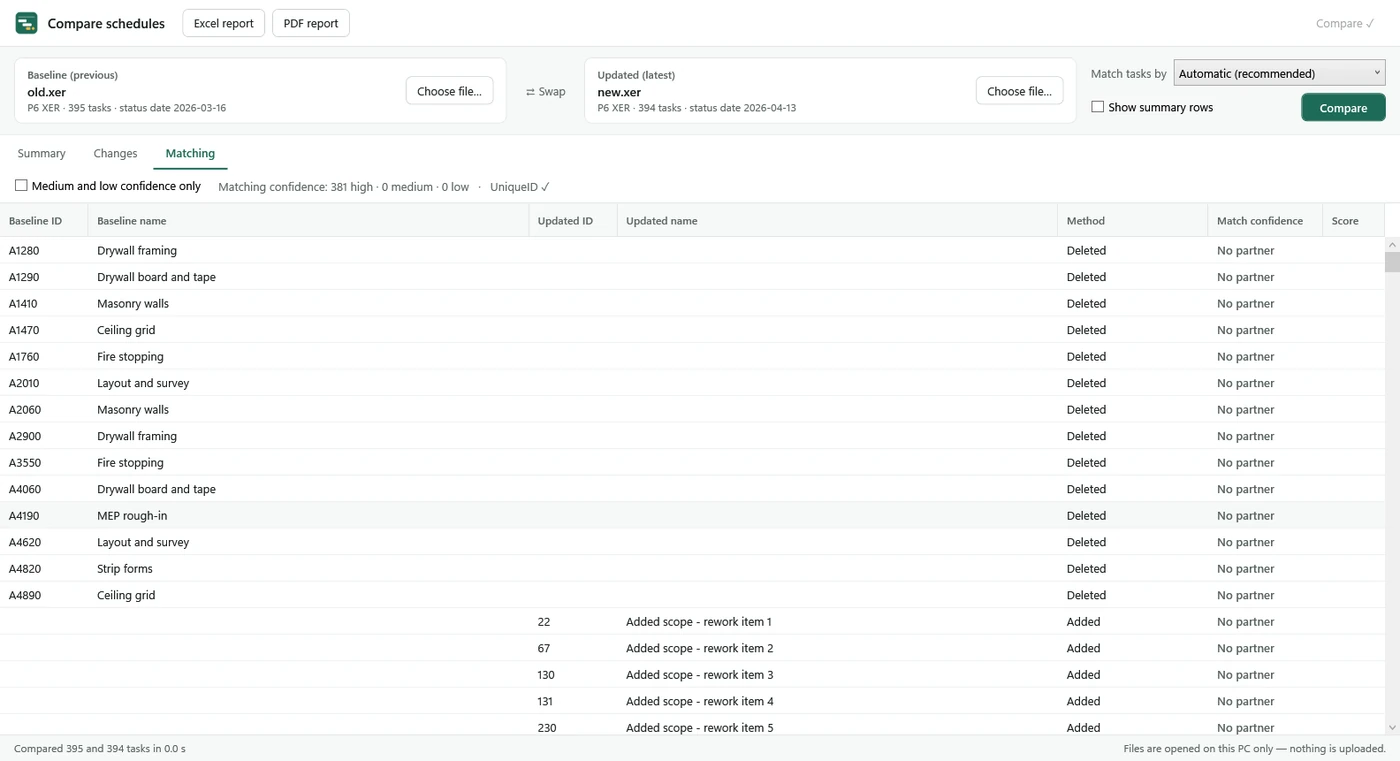
- Activities are paired using IDs, WBS paths and names, with a matching method and confidence shown for every pair.
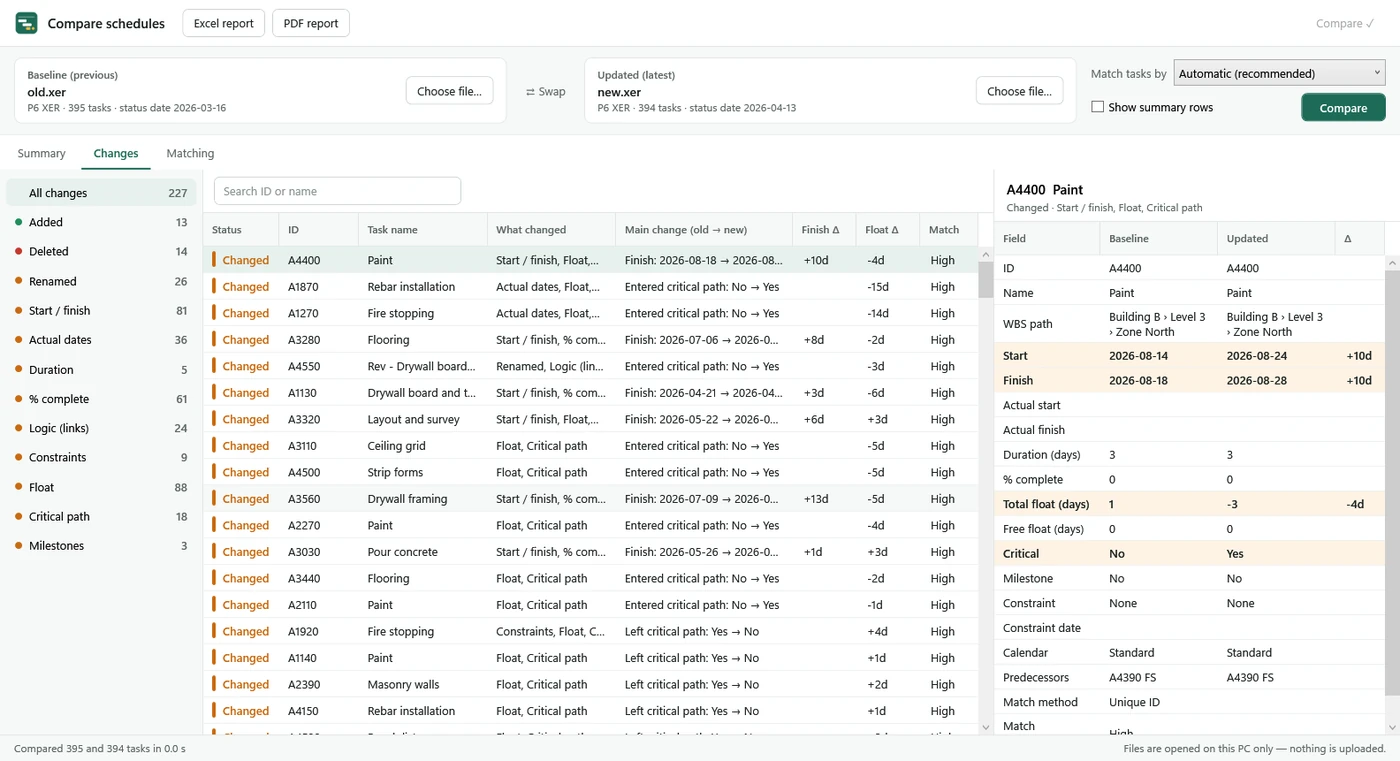
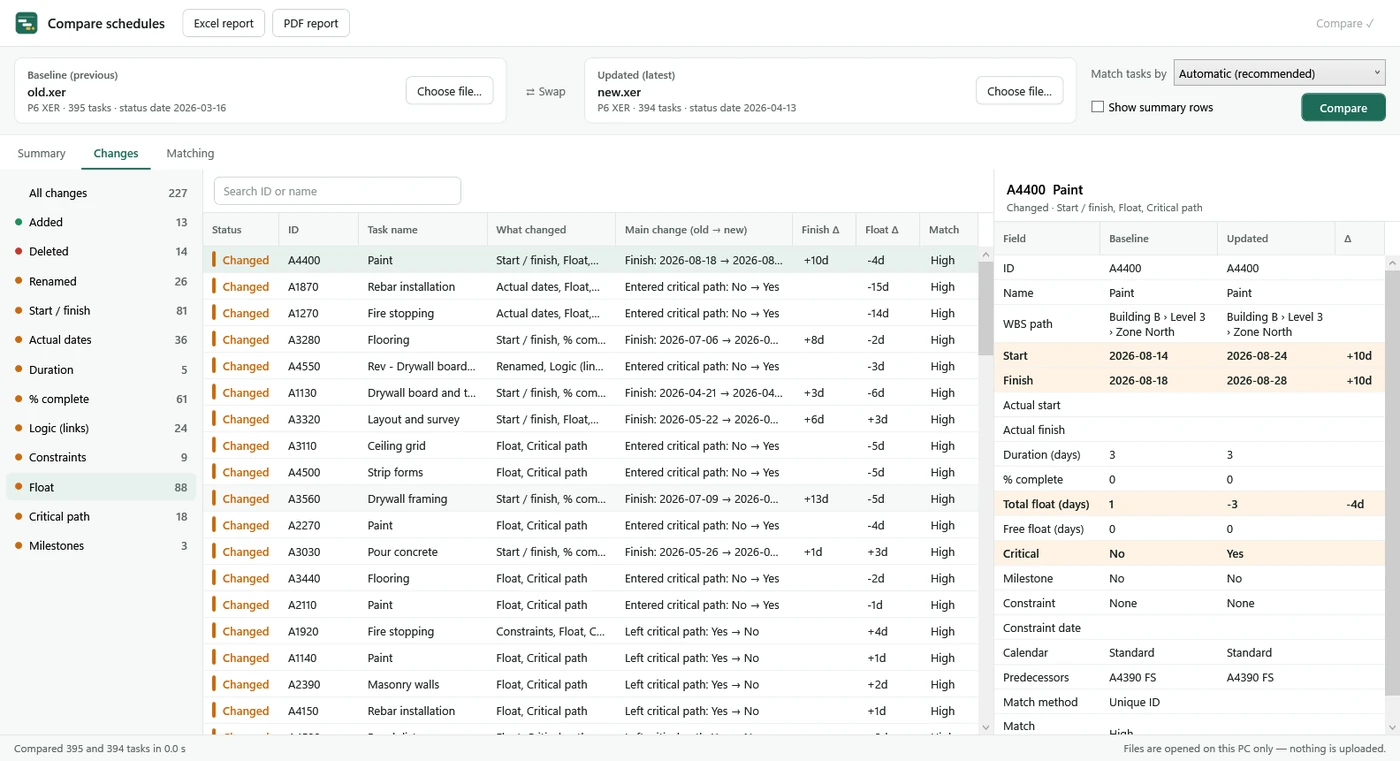
- Find additions, deletions, renames, start/finish and actual-date moves, duration and progress changes.
- Inspect changes to links, link types and lag, constraints, calendars, total/free float, critical path entries and exits, milestone slips and WBS moves.
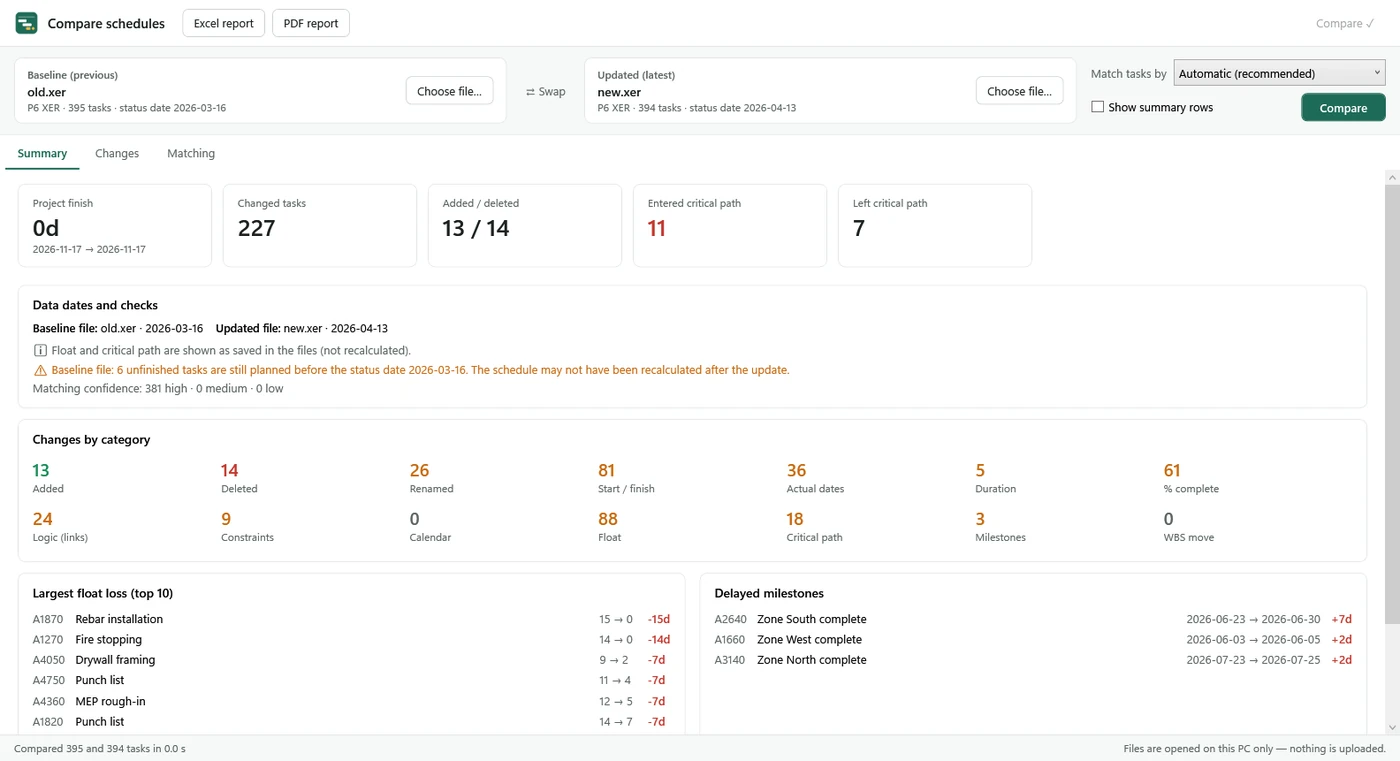
- The summary shows project finish changes, the top 10 float losses, delayed milestones and data-date checks.
- Summary counts and the top 10 changes are free. The full list and comparison Excel/PDF reports require the Compare + Edit + Quality Check subscription.
Edit and save
Make quick fixes without the original scheduling software: rename tasks, change start, finish, duration and % complete, add notes, add or delete tasks, and add or remove links (FS, SS, FF, SF with lag). Every edit can be undone, and a list shows what you changed before you save. Edits are saved to a new Microsoft Project XML (.xml) file; P6 files can also be saved as XER. The file you opened is not changed.
- Saving to .mpp is not possible.
- Changing a date does not reschedule later tasks or recalculate float. Microsoft Project or Primavera P6 recalculates the schedule when you open the saved file (P6: F9).
- A moved start keeps a “start no earlier than” constraint so it stays where you put it. Bar styles and view settings are not saved.
- You can try every edit for free; saving needs the Compare + Edit + Quality Check subscription.
Schedule quality check (DCMA 14-point)
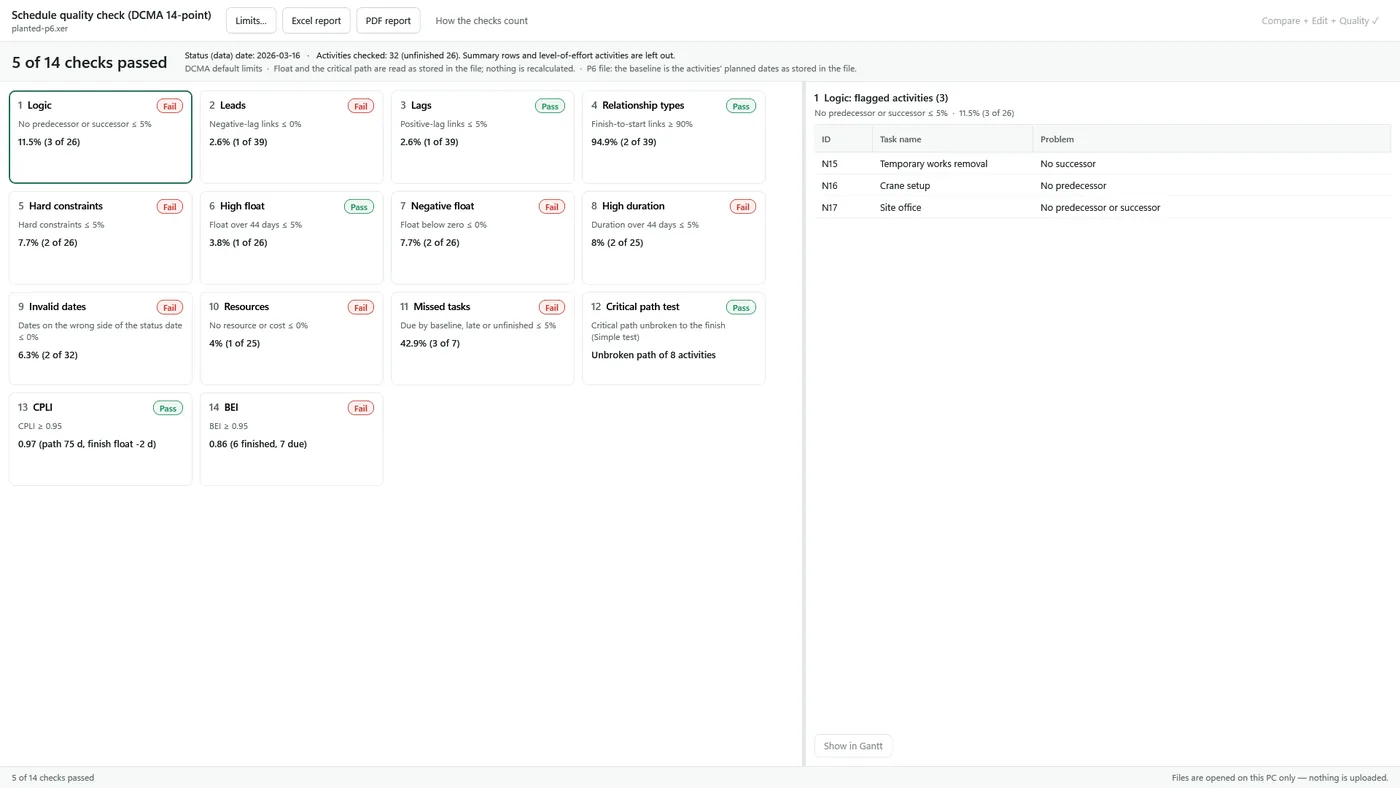
Check the open XER or MPP file against the 14 points of the DCMA schedule assessment: logic, leads, lags, relationship types, hard constraints, high and negative float, high duration, invalid dates, resources, missed tasks, critical path, CPLI and BEI.
- Each check shows its value, the DCMA limit and pass or fail. Checks that need a status date, a baseline or resources the file does not have are marked “Not checked” with the reason instead of failing.
- The free version shows every check’s pass/fail result and the score. Flagged activities (one click to the Gantt chart), your own limits and Excel/PDF quality reports are part of the Compare + Edit + Quality Check subscription.
- Float and the critical path are read as stored in the file; nothing is recalculated, so the critical path test is a simple check of the stored critical path. For P6 files the baseline is the planned dates stored in the file.
See how the DCMA 14-point check works for every check, its limit and the reasons for “Not checked”.
Pricing and access
| Plan | Price | Included |
|---|---|---|
| Viewing | Free | Read schedules. Comparison summary counts and top 10 changes. Try every edit (saving needs the subscription). Quality check pass/fail for all 14 checks and the score. |
| Pro | One-time purchase · no subscription | Single-schedule Excel (CSV) export and printable PDF reports with the Gantt chart. |
| Compare + Edit + Quality Check · yearly | $99.99/year · 1-week free trial | Full comparison list and comparison Excel/PDF reports, saving edits, DCMA quality check values, flagged activities, limits and Excel/PDF quality reports, and all Pro features. |
| Compare + Edit + Quality Check · monthly | $12.99/month · 1-week free trial | Full comparison list and comparison Excel/PDF reports, saving edits, DCMA quality check values, flagged activities, limits and Excel/PDF quality reports, and all Pro features. |
Subscriptions renew automatically at the selected interval and can be cancelled in your Microsoft account. The trial is once per customer. Prices are in USD; check the purchase screen.
Review the results
- Viewing and comparison never change or reschedule the source files; edits are saved to a new file. Float and critical path are read as saved in the files, not recalculated.
- Review each pair's matching method and confidence. Check low-confidence pairs before submitting.
- XER comparison is in beta. Verify key results in P6 before using them.
Private by design
Viewing, comparison, editing and the quality check run locally and offline. Nothing is uploaded. Read the Privacy Policy.