SOYATOOLS / GUIDES
How to open an XER file without Primavera P6
Received a Primavera P6 .xer schedule but need to review it without P6? A read-only viewer can help you inspect the file. If you only need a static review copy, you can also ask the sender for a report.
The update with schedule comparison is currently in Microsoft Store certification. Check the Store for availability of the new features.
Open the XER locally
- Install MPP & XER Viewer - Gantt Chart & Schedule from Microsoft Store, checking the availability of the update.
- Open the .xer file on your Windows PC.
- Review the tasks, dates, dependencies, resources and Gantt chart. Use search and zoom to inspect the schedule.
Viewing is free. The app reads the schedule on your PC without uploading it. It does not replace P6 for editing or rescheduling.
Save a review copy
A one-time Pro purchase enables Excel (CSV) export and printable PDF reports with the Gantt chart for a single schedule. This is separate from full two-version comparison.
Compare an XER update with an earlier schedule
Choose previous/latest files to compare two versions. Cross-format comparison includes MPP versus XER and MS Project XML versus P6 XML. Inspect additions, deletions, dates, logic, float and milestones, and review the matching method and confidence.
XER (Primavera P6) comparison is in beta. Check key results, including float and critical path, against P6 before submitting a report, and let us know if anything differs.
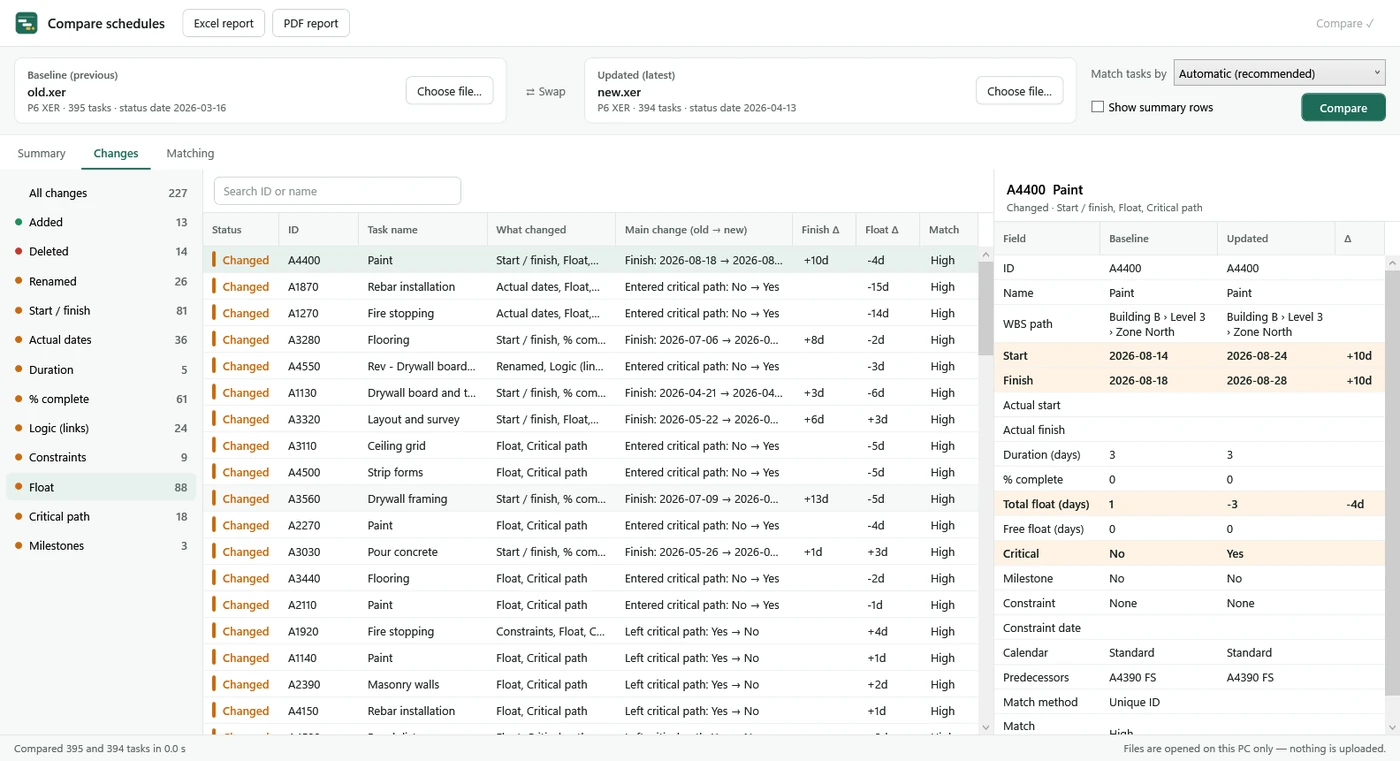
Summary counts and the top 10 changes are free. The full list and comparison Excel/PDF exports require the Compare subscription, which includes Pro. Read the monthly schedule comparison guide for a review workflow.
Pricing and access
| Plan | Price | Included |
|---|---|---|
| Viewing | Free | Read schedules. Comparison summary counts and top 10 changes. |
| Pro | One-time purchase · no subscription | Single-schedule Excel (CSV) export and printable PDF reports with the Gantt chart. |
| Compare · yearly | $99.99/year · 1-week free trial | Full comparison list, comparison Excel/PDF reports and all Pro features. |
| Compare · monthly | $12.99/month · 1-week free trial | Full comparison list, comparison Excel/PDF reports and all Pro features. |
Subscriptions renew automatically at the selected interval and can be cancelled in your Microsoft account. The trial is once per customer. Prices are in USD; check the purchase screen.
Review the results
- This is a read-only viewer and comparison tool. It does not edit or reschedule the source files. Float and critical path are read as saved in the files, not recalculated.
- Review each pair's matching method and confidence. Check low-confidence pairs before submitting.
- XER comparison is in beta. Verify key results in P6 before using them.
If a static report is enough
Ask the sender for a PDF or Excel copy suited to your review. That can be enough for reading selected information, but does not provide two original schedule files for activity-by-activity comparison.
See the app page and Privacy Policy, or contact support.