
WINDOWS APP
.mny (Microsoft Money)
MNY File Viewer
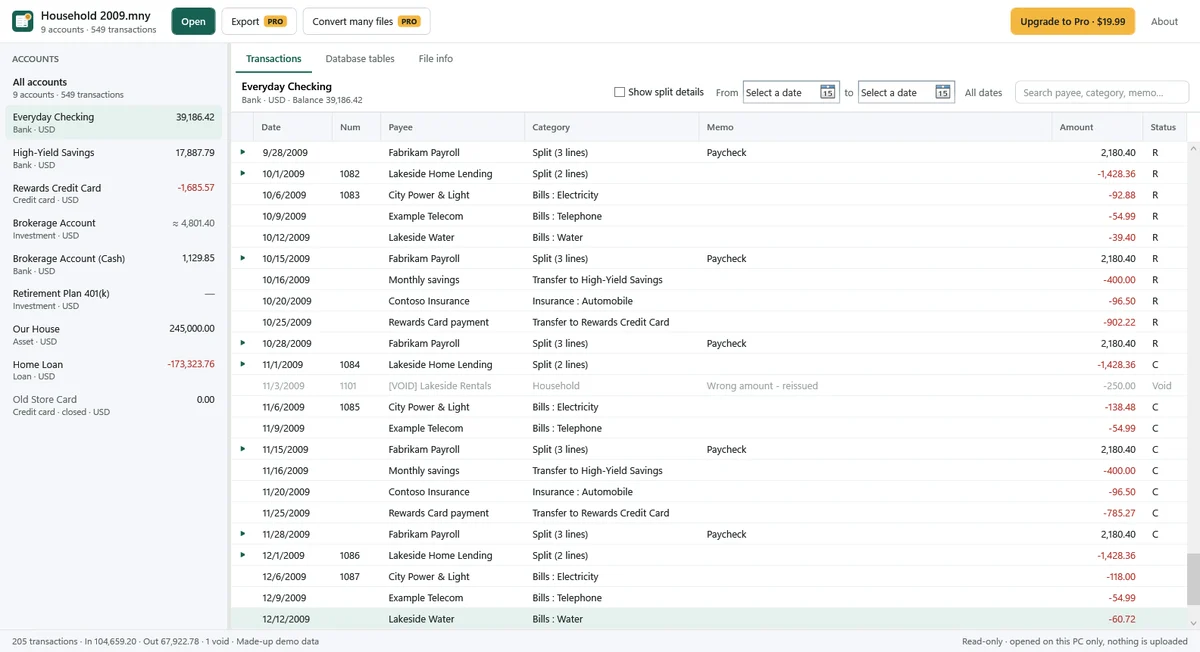
Open old Microsoft Money files (.mny) on Windows without Money. See every account and transaction — splits, transfers and investments included — and export them to Excel, CSV or QIF with Pro. Your file is only read, on your PC.
Free: open and read
- Open .mny files from Money 2001 to Money Plus Sunset by double-clicking, dragging into the window or choosing Open. No Money installation needed.
- Files with a Money password open when you enter the password. The password is not saved.
- See all accounts with balances: bank, credit card, investment, asset and loan accounts.
- Browse transactions per account or for all accounts, with sorting, search and a date range.
- Open split transactions to see each line with its own category and memo; see transfers, void transactions, cleared/reconciled status and classifications.
- Investment transactions show the security, shares, price and commission.
- Look at the database tables inside the file, read-only. Copy a cell or one row.
Pro: export and convert
$19.99, one-time purchase. No subscription.
- Export transactions of all accounts or one account to Excel (.xlsx) or UTF-8 CSV. Dates and amounts are real dates and numbers; split transactions become one row per split line.
- Export one QIF file per account to move to Quicken, GnuCash or Moneydance, with opening balance, splits, transfers and cleared status. Choose US (MM/DD/YYYY) or day-first dates and Windows or UTF-8 text.
- Export lists: accounts with balances, payees, categories and securities.
- Convert many .mny files at once (an Excel workbook, CSV files or a folder of QIF files per Money file).
- Copy many rows at once.
Tested scope
Tested with files from Money 2001, 2002, 2004, 2005, 2008 and Money Plus Sunset, with and without passwords. In our checks, every transaction field and account balance matched an independent reader (Jackcess) and the balances asserted in KDE Skrooge's import tests. The largest test file had 4,629 transactions and opened in under a second.
Good to know
- Investment market values are only an estimate, and only for simple accounts: shares from buys and sells × the last price stored in the file (no online prices). Stock splits, options and 401(k) statement updates are not supported; their transactions are still shown as stored.
- Forgotten passwords cannot be recovered. The app has no password removal.
- QIF: a transfer appears in both accounts' files; import carefully so your program doesn't add it twice. Investment accounts export Buy, Sell, Dividend and Interest only.
- Reports, budgets and online banking settings are not shown. Account numbers are stored in a hidden form and are not shown.
- A damaged file shows what can be read, with a warning that data is missing. Missing data is not recovered.
- This is a viewer and converter. It never edits or changes .mny files.
Private by design
Money files are read locally, never uploaded or collected by SoyaTools. Exports are written where you choose on your PC. Microsoft Store handles Pro payment and license verification. Read the Privacy Policy.
Bank statements as PDFs? See Statement PDF to Excel. Microsoft Access databases: ACCDB & MDB File Viewer.