
WINDOWS APP
.dbf · .dbt · .fpt
DBF File Viewer
Open dBase, FoxPro, Clipper and Shapefile .dbf tables on Windows. Read memo fields, choose the right text encoding, then save a copy as Excel or CSV with Pro. Files are processed on your PC.
Just need a quick look? Open .dbf files online in your browser – nothing to install, nothing is uploaded.
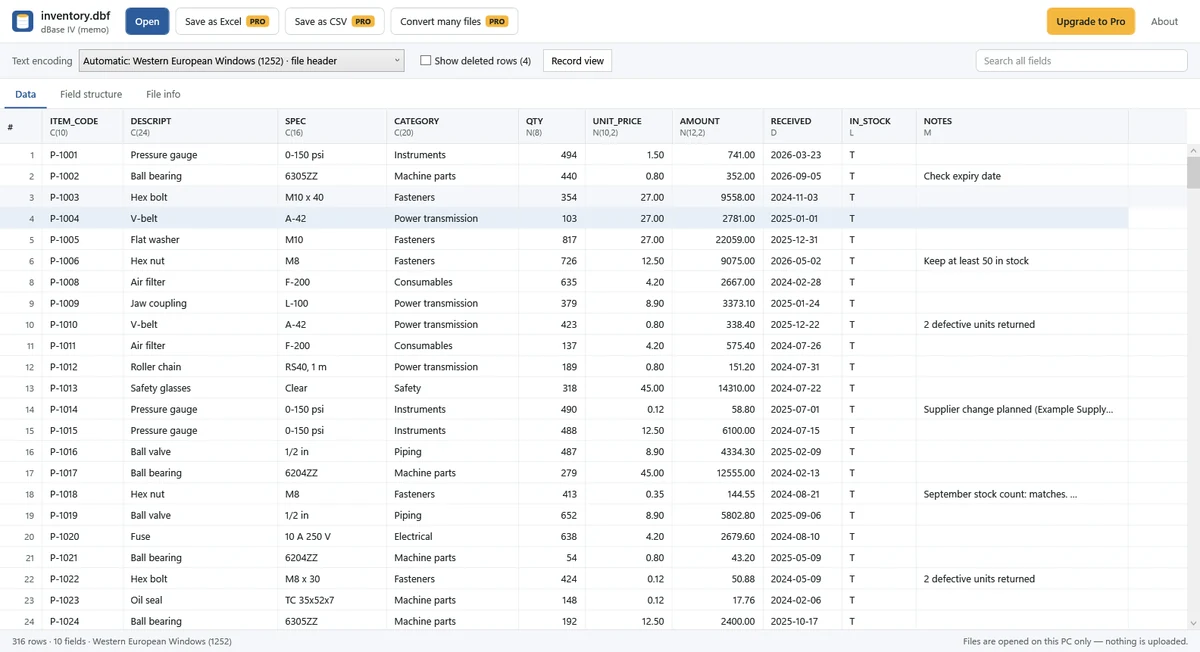
Free: open and read
- Open .dbf files from dBase III/IV/5/7, FoxPro, Visual FoxPro and Clipper, including Shapefile attribute tables.
- Read memo text automatically from matching .dbt or .fpt files in the same folder.
- Use automatic character-set selection or switch manually for Korean, Cyrillic, Japanese, Chinese, Western and Central European text, and more.
- Sort columns, search every field including full memo text, and show or hide records marked as deleted.
- Inspect all fields and full memo text in Record view, or check the Field structure and File info tabs.
- Copy one cell or one row.
Pro: convert and export
$7.99, one-time purchase. No subscription.
- Save as Excel (.xlsx), keeping numeric, date and true/false types, with a header row, filters and a frozen header.
- Save as UTF-8 CSV with a byte order mark (BOM).
- Copy multiple rows at once.
- Convert multiple .dbf files to Excel or CSV in one batch.
Single-file exports follow the current search, sort order and deleted-record setting. Batch conversion chooses encoding automatically for each file and excludes records marked as deleted.
Supported files and tested scope
The app reads DBF tables and their .dbt (dBase III/IV) or .fpt (FoxPro/Visual FoxPro) memo files. It also uses a matching .cpg file when choosing a Shapefile table's character set. Manual encoding selection takes priority.
In our tests, a 165 MB file with 1,000,000 rows opened to its first screen in about 0.5 seconds (0.49 seconds measured). Opening time depends on your PC and file.
Good to know
- This is a viewer and converter. It does not edit .dbf files, run SQL queries or display Shapefile map geometry (.shp).
- Keep memo sidecars in the same folder with the same base name: for example, inventory.dbf and inventory.dbt. A missing memo file cannot be reconstructed by the viewer.
- Automatic encoding can need adjustment. Check names, accented characters and memo text before exporting.
- Index files (.cdx, .ndx, .mdx) are not needed or used. Picture, OLE and binary fields show their size only. Visual FoxPro NULL values appear as empty cells.
- Excel exports store numbers longer than 15 digits as text to preserve precision. Memo text longer than Excel's 32,767-character cell limit is truncated in .xlsx output.
- Damaged or wrong-format files show a message. A partially readable file can show available rows with a warning; this does not recover missing data.
Private by design
DBF and memo contents stay on your PC and are never uploaded or collected by SoyaTools. Local viewing and conversion work offline; Microsoft Store handles purchase and license checks. Read the Privacy Policy.
Guides
- Open a DBF file without dBase: encoding, memo files and Excel/CSV export
- DBF 파일 열기·한글 깨짐·메모 누락 해결 (한국어)
For Access (.mdb · .accdb) files, see ACCDB & MDB File Viewer.