
WINDOWS APP
.sav · .zsav · .dta
SAV & DTA File Viewer
Open SPSS (.sav, .zsav) and Stata (.dta) data files on Windows without SPSS or Stata. Read variables, labels and missing values for free, then save an Excel or CSV copy with Pro. Your files stay on your PC.
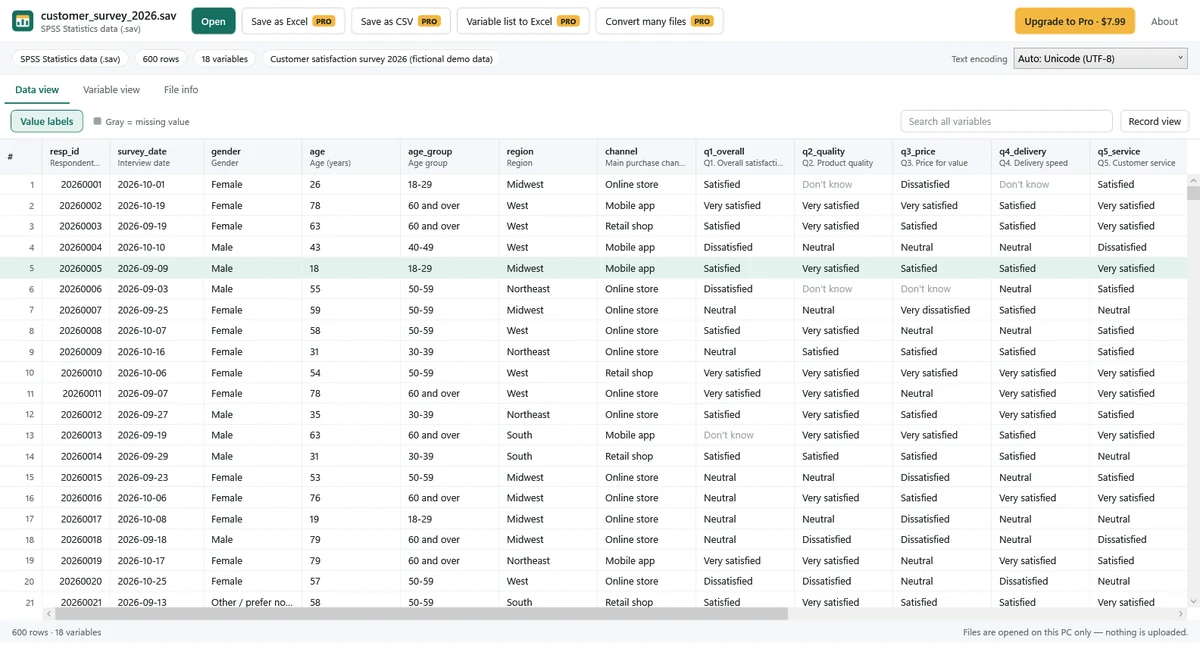
Free: open and read
- Open SPSS .sav and .zsav files and Stata .dta files, including older Stata formats.
- See variable names and labels, sort the data and search every variable.
- Switch between stored codes and value labels with one click.
- See missing values in gray, including SPSS user-missing values and Stata .a–.z.
- Use Variable view to inspect types, display formats, labels, value labels, missing values and measure levels.
- Check File info for row and variable counts, file labels, notes and text encoding.
- Read every variable of a case in Record view, or choose text encoding manually for older files.
- Copy a cell or one row. File viewing works offline without upload.
Pro: convert and export
One-time purchase. No subscription. Check Microsoft Store for the current price.
- Save as Excel (.xlsx) or CSV, choosing stored values or value labels. Dates become real Excel dates in .xlsx output.
- Save the variable list (codebook), including value labels, as Excel.
- Copy multiple rows at once with headers.
- Convert multiple files at once.
Supported files and performance
The app reads SPSS .sav and .zsav data and Stata .dta data. In our tests, a file with 100,000 rows and 200 variables opened in about 1–2 seconds. Opening time depends on your PC and file.
Good to know
- This is a viewer and converter. It does not edit data, run statistical analyses or make charts.
- SAS (.sas7bdat, .xpt), SPSS portable (.por) and SPSS output (.spv) files are not supported in this version.
- If an older file's text looks wrong, choose the text encoding manually and check the result.
- A truncated or damaged file produces a message. When possible, the app opens rows it can read; this does not restore missing data.
Private by design
Files are processed locally on your PC, never uploaded or collected by SoyaTools. Excel and CSV exports are saved to locations you choose. Microsoft Store handles Pro purchases. Read the Privacy Policy.