SOYATOOLS / GUIDES
Convert PES to DST (and JEF, EXP) on Windows
Embroidery machines read different formats: PES for Brother, DST for Tajima, JEF for Janome and EXP for Bernina and Melco. Converting a PES design keeps the stitches, but the target format may not keep everything the PES file had, such as thread colors and trims. Check what changes before you save.
What changes in each format
PES & DST Embroidery Viewer saves to PES, PEC, DST, JEF and EXP. VP3, XXX and HUS files can be opened but not saved.
| Save as | Thread colors | Trims and stops |
|---|---|---|
| PES (v6, with thread colors) | Stored in the file | — |
| PES v1 (older machines), PEC | Moved to the nearest thread-chart color | — |
| DST | Not stored (DST has no thread colors) | No trim command: trims are written as runs of jumps. Stops become color changes. |
| DST + color list in header | A color list is also written in the file header | As DST |
| JEF | Moved to the nearest thread-chart color | No trim command: trims are written as runs of jumps. |
| EXP | Not stored (EXP has no thread colors) | Stops become color changes. |
You do not have to remember this table: for each file, the app lists what actually changes before you save.
Steps
- Install the app from Microsoft Store and open the .pes file (choose Open or drag it onto the window). Check the design for free first.
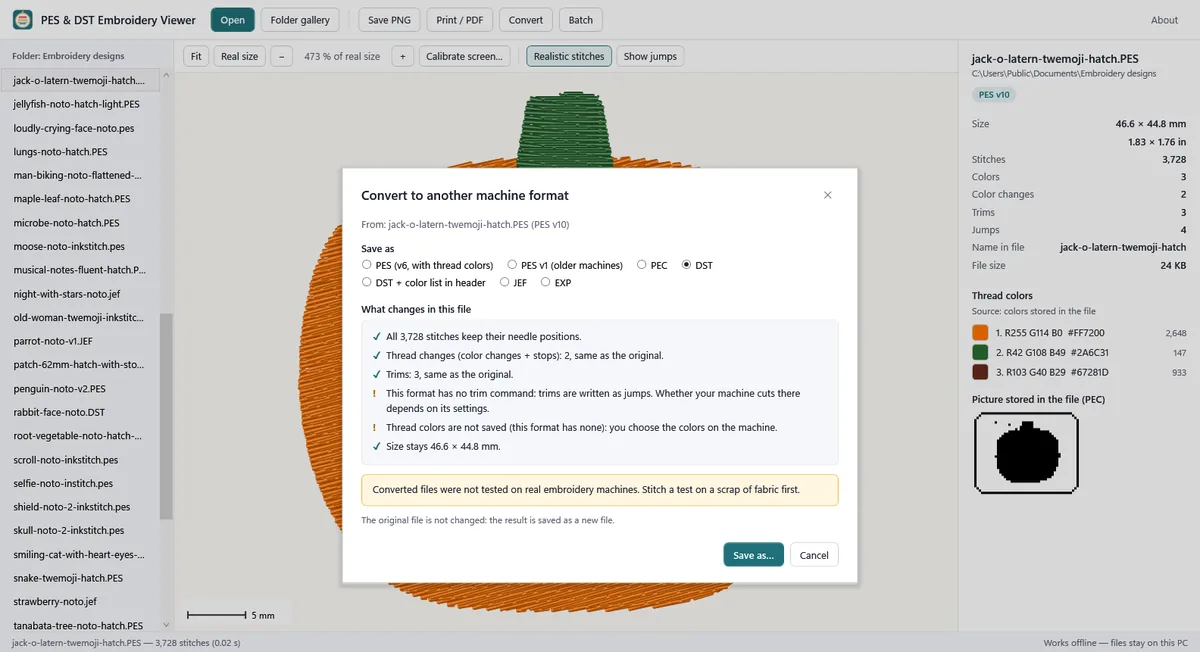
- Choose Convert and pick a format under Save as.
- Read What changes in this file. The app converts in memory, reads the result back and lists the numbers for this file: needle positions, thread changes, trims (for example original 4 → result 3), colors lost or moved to the nearest chart color, stops that become color changes, and the size.
- Choose Save as…. The result is saved as a new file; the original file is never overwritten.
- Stitch a test on scrap fabric before using the converted file on a real project.
Measured, not promised
- 6,360 conversions read back: every needle position and every thread change kept.
- Trims kept for 93 % (DST) and 48 % (JEF) of PES designs. These two formats have no trim command, so trims become runs of jumps.
- In 5,565 checks, the numbers in the change list matched the saved file read back.
Limits
- Converted files were not tested on real embroidery machines. Stitch a test on scrap fabric first.
- DST and JEF have no trim command: trims are written and read as runs of jumps; whether your machine cuts there depends on its settings.
- DST and EXP store no thread colors. You choose the colors on the machine.
- There are no hoop checks for particular machines; the size is shown so you can compare.
- Damaged files are not repaired.
- The folder batch makes PNGs, PDFs, a catalog PDF and an info CSV. It does not convert designs to other formats.
FAQ
Can I convert DST to PES?
Yes, any design the app opens can be saved as PES, PEC, DST, JEF or EXP. A DST file has no thread colors, so the PES gets default colors; the app tells you before you save.
Do I need the Pro version to see what would change?
Converting, including the change list, is part of Pro. Opening the file, its size, counts and thread colors are free.
Is the original file changed?
No. The converted design is always saved as a new file, and nothing is uploaded.