SOYATOOLS / GUIDES
How to open a Microsoft Money .mny file without Money (and export to Excel, CSV or QIF)
Years of household or small-business finances can sit in an old .mny file. Microsoft Money has been discontinued, and the official download of Money Plus Sunset is no longer offered. Without Money, Windows has no program for the file. Here is how to read it and get the data out.
Why the file no longer opens
A .mny file is Money’s own database format and can be protected with a Money password. Money was discontinued, and Microsoft no longer offers the official Money Plus Sunset download. Copies of the installer on other websites are not from Microsoft, so be careful with them. Renaming the file does not help: the data has to be read by a program that understands the Money format.
Open it with MNY File Viewer
- Install MNY File Viewer from Microsoft Store.
- Double-click the .mny file, drag it into the window or choose Open. No Money installation is needed.
- If the file has a Money password, type it. The password is used only to open the file and is not saved.
- Pick an account to see its transactions, or look at all accounts together. Sort, search and set a date range.
- Open a split transaction to see each line with its own category and memo.
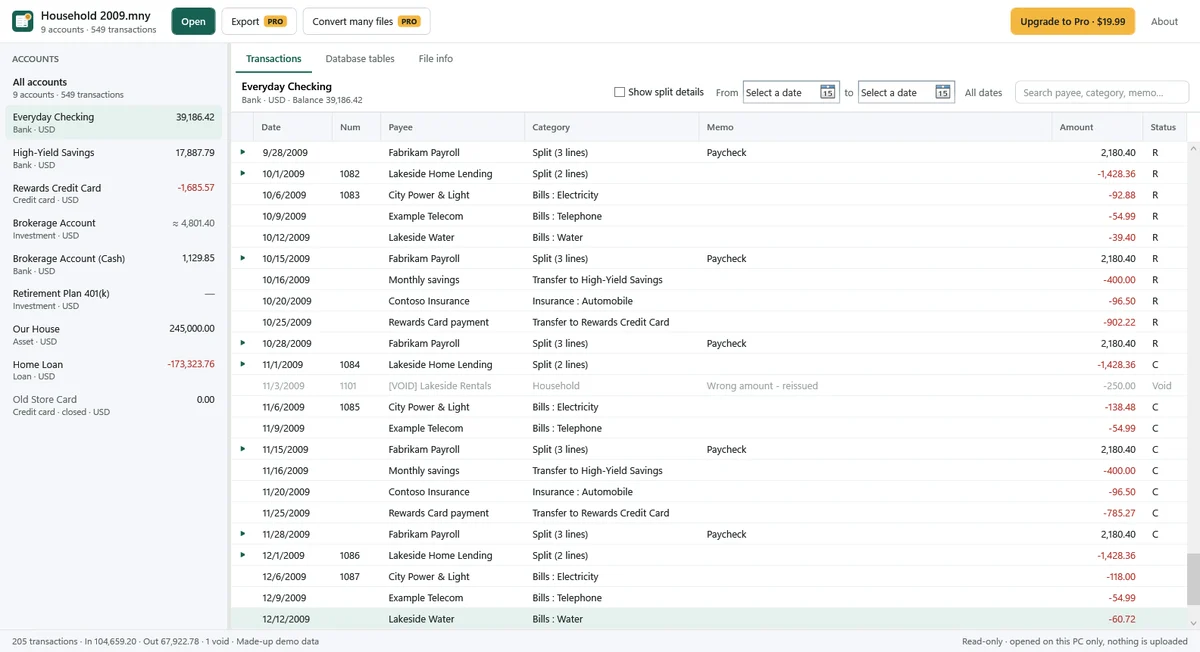
What you can see for free
- Files from Money 2001 to Money Plus Sunset, with or without a password.
- All accounts with their balances: bank, credit card, investment, asset and loan accounts.
- Transactions per account or for all accounts; split lines, transfers, void transactions, cleared and reconciled status, and classifications.
- Investment transactions with the security, shares, price and commission.
- The database tables inside the file, read-only. Copy a cell or one row.
Export to Excel, CSV or QIF (Pro)
- Excel (.xlsx) or UTF-8 CSV: transactions of all accounts or one account, with real dates and numbers and one row per split line.
- QIF: one file per account to move to Quicken, GnuCash or Moneydance, with the opening balance, splits, transfers and cleared status. Choose US (MM/DD/YYYY) or day-first dates and Windows or UTF-8 text.
- Lists: accounts with balances, payees, categories and securities.
- Many files at once, and copying many rows.
Pro is $19.99, a one-time purchase in Microsoft Store, not a subscription.
If Money stored a split whose lines do not add up to its total, the export adds a line for the unassigned amount, so the exported totals still match the account balance.
Tested scope
Tested with files from Money 2001, 2002, 2004, 2005, 2008 and Money Plus Sunset, with and without passwords. Compared with an independent reader (Jackcess), 4,331 transactions and 77,958 fields matched, and all 29 account balances matched; the balances expected in KDE Skrooge’s import tests matched too (22 of 22). The largest test file had 4,629 transactions and opened in under a second.
No test files were available from Money 99, 2000, 2006 or 2007, the Home & Business edition or a Korean edition, so those were not tested.
Limits
- Investment market values are only an estimate, and only for simple accounts: shares from buys and sells × the last price stored in the file (no online prices). Stock splits, options and 401(k) statement updates are not supported; their transactions are still shown as stored.
- Forgotten passwords cannot be recovered, and the app has no password removal.
- QIF: a transfer appears in both accounts’ files, so import carefully to avoid adding it twice. Investment accounts export Buy, Sell, Dividend and Interest only. The QIF files have not yet been tried in Quicken, GnuCash or Moneydance themselves; check the result after importing.
- With Windows text, QIF uses your PC’s code page; characters that are not in it become “?”. Choose UTF-8 to keep them.
- Reports, budgets and online banking settings are not shown. Account numbers are stored in a hidden form and are not shown.
- A damaged file shows what can be read, with a warning that data is missing. Missing data is not recovered.
- The app never edits or changes the .mny file.
Files are read on your PC only. See the Privacy Policy.
FAQ
Can I still download Microsoft Money Plus Sunset?
Microsoft no longer offers the official download. Installers on other websites are not from Microsoft.
My .mny file has a password. Can I open it?
Yes, if you know the password: type it when the app asks. Forgotten passwords cannot be recovered, and the app has no password removal.
Can I move my Money data to Quicken, GnuCash or Moneydance?
Pro exports one QIF file per account for that. A transfer appears in both accounts’ files, and the QIF files have not yet been tried in those programs, so check the result after importing.
Will the app change my .mny file?
No. The file is only read. Exports are written as new files where you choose.
Which Money versions work?
Files from Money 2001 to Money Plus Sunset were tested. Money 99, 2000, 2006, 2007, Home & Business and Korean-edition files were not available for testing.