SOYATOOLS / GUIDES
How to open .hlp help files on Windows 11 and 10
A .hlp file is an old Windows Help (WinHelp) file, the help format of many programs from the Windows 3.1 and Windows 95 era. Windows 10 and 11 no longer include a program that shows them, so the help file of an old program, or a manual kept on an old CD, seems to open nowhere. A separate viewer can read the file in its own window.
Why Windows 11 won’t open .hlp files
WinHelp files were shown by the Windows Help program, WinHlp32.exe. Starting with Windows Vista, Windows no longer opened .hlp files directly. In its list of deprecated Windows features, Microsoft says the Windows Help Viewer (WinHlp32.exe) “is no longer supported in Windows 10” and points to online help instead. Another Microsoft Learn page says the Windows Help application is not included as a part of the Windows operating system and asks developers to move their help to other formats such as .chm or HTML.
For Windows Vista and Windows 7, Microsoft offered WinHlp32 as a separate download. For Windows 10 and 11, the Microsoft pages above offer no such download; they only say the viewer is no longer supported. Old programs that try to open their help may show an error such as “Feature not included” or “Help not supported”, the wording Microsoft used in the title of its support article on this error.
You may find instructions online for copying WinHlp32 from an older Windows version over protected system files. This guide does not cover that. HLP Viewer does not need WinHlp32, administrator rights, or any change to Windows system files.
.hlp is not .chm
Compiled HTML Help (.chm) is the newer help format, and Windows still opens it. If your file ends in .chm, double-click it as usual; you don’t need this guide. HLP Viewer opens only .hlp files and does not support .chm.
Open a .hlp file with HLP Viewer
- Install HLP Viewer from Microsoft Store and start it from the Start menu.
- Drag the .hlp file into the HLP Viewer window, or click Open and choose the file. Double-clicking a .hlp file in File Explorer can’t open HLP Viewer: Windows protects the .hlp file type, and the app doesn’t change anything in Windows to get around that. Files you opened before are in the recent files list, one click away.
- If a
.cntfile with the same name sits next to the help file, its contents tree appears on the left. Without one, you get a list of all topics. Keep any other .hlp files that the help links to in the same folder, so those links work too. - Use the keyword index, or full-text search, which highlights the words you searched for in the topic. Links, popup boxes, and back and forward work.
- If the text looks garbled, choose the text encoding at the bottom of the window. Encoding is detected automatically, for example for Korean or Cyrillic help files.
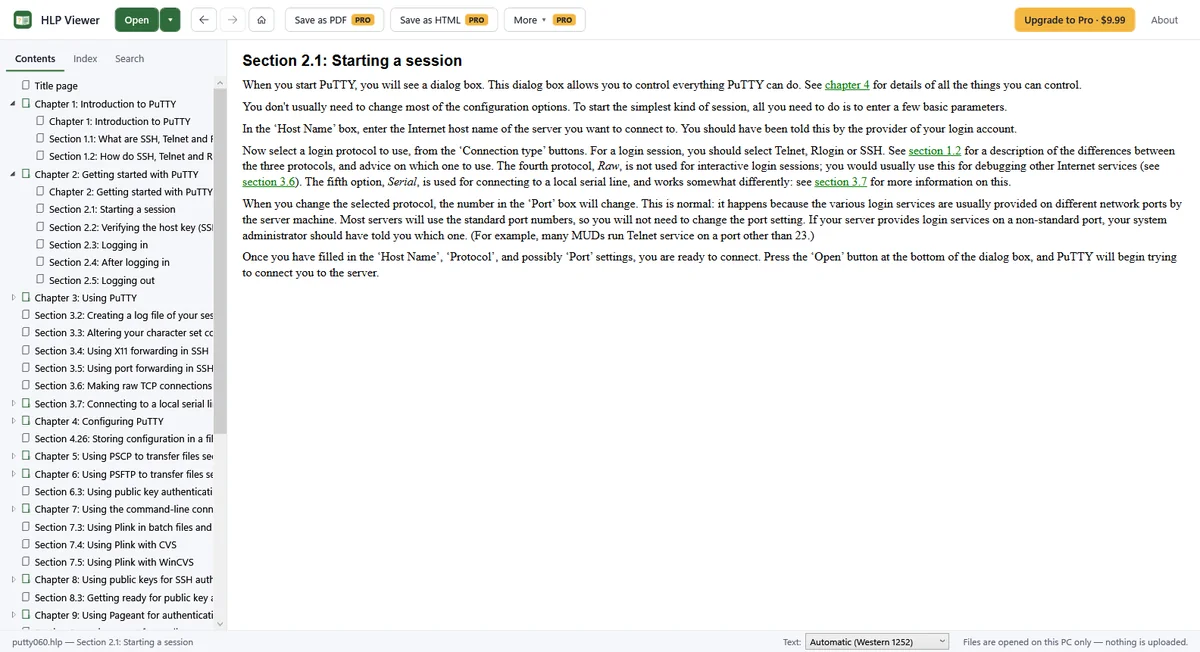
What you can read for free
- WinHelp 3.0, 3.1 and 4.0 (Windows 95) help files.
- The contents tree, the topic list, the keyword index and full-text search.
- Fonts, tables and pictures: bitmaps, hotspot pictures and WMF drawings, shown at their original size.
- Links into other .hlp files in the same folder.
Keep it as PDF or HTML (Pro)
If you want a copy that opens anywhere, Pro saves the help file as a PDF, with the contents as bookmarks, or as HTML (one page and a folder of pictures). It can also convert a whole folder of help files to PDF or HTML and lists the files that failed, and it prints the current topic. Pro is a one-time $9.99 purchase in Microsoft Store, not a subscription; check the local price in the Store.
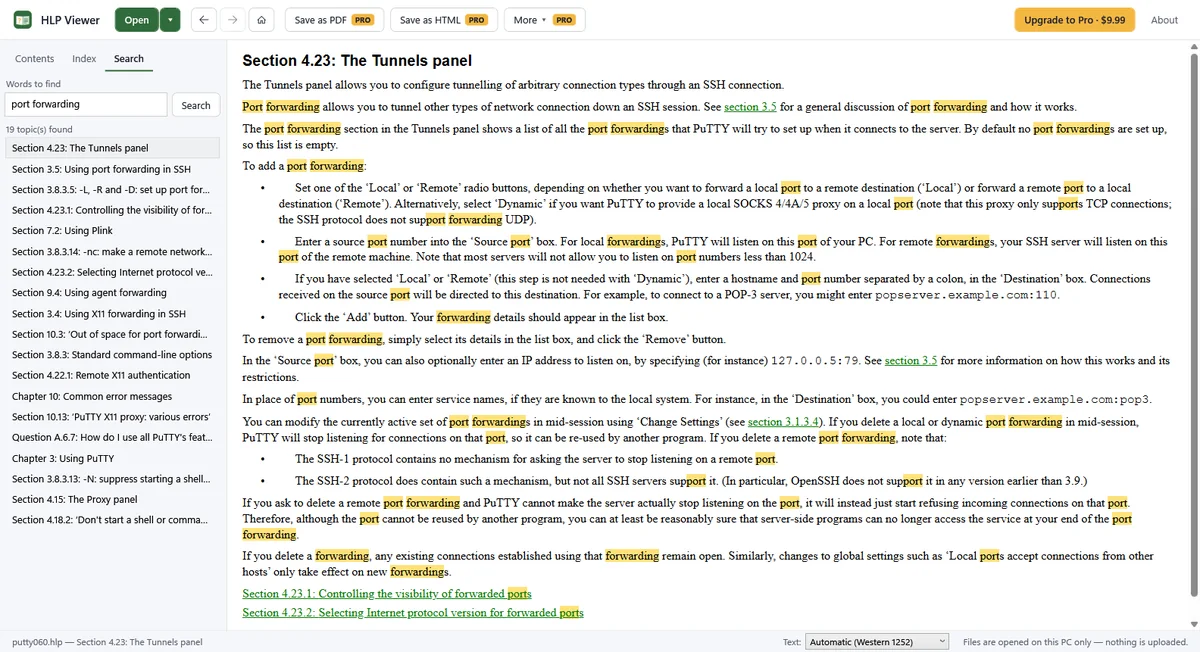
Limits
- Help macros are not run. Buttons, commands that start programs and secondary windows are shown, but do nothing.
- EMF pictures and Multimedia Viewer (.mvb) files are not supported.
- Japanese and Chinese help files have not been tested yet. If their text looks wrong, choose the encoding by hand.
- In testing, 41 help files were opened and saved as PDF and HTML, and about 225 more were read by the parser, with no failures. All 102 Korean Windows 3.1 and Windows 95 help files tested had their encoding detected correctly.
FAQ
Why doesn’t double-clicking the .hlp file open HLP Viewer?
Windows protects the .hlp file type, so it can’t be set to open in this app, and HLP Viewer does not change Windows to work around it. Start HLP Viewer first, then drag the file into the window or click Open. The recent files list makes reopening quick.
Can I download WinHlp32 from Microsoft for Windows 11?
Microsoft’s documentation mentions WinHlp32 downloads for Windows Vista and Windows 7. For Windows 10, its deprecated features list says the Windows Help Viewer is no longer supported. HLP Viewer reads .hlp files without WinHlp32.
My file is .chm, not .hlp. Will this help?
No. .chm (compiled HTML Help) is a different format that Windows still opens by itself. HLP Viewer does not open .chm files.
The help file has buttons that don’t work. Why?
Those buttons run help macros, which HLP Viewer does not run. The text, links, popups and pictures are still readable.
Is the help file uploaded anywhere?
No. Help files are read on your PC. The app collects nothing; Microsoft Store handles the Pro purchase. See the HLP Viewer privacy policy.