SOYATOOLS / GUIDES
How to open a DBF file without dBase
A .dbf file can be a dBase, FoxPro or Clipper table, or the attribute table in a Shapefile dataset. If Excel shows garbled text or empty memo fields, check the text encoding and companion files before converting. Keep an untouched copy of the originals.
Just need a quick look? Open .dbf files online in your browser – nothing to install, nothing is uploaded.
Why does a DBF look wrong in Excel?
| What you see | Possible reason | What to check |
|---|---|---|
| Garbled names or accented characters | The character set does not match the data. | Try the original file's encoding before exporting. |
| An empty or missing memo column | Long text is in a separate .dbt or .fpt file, or the reader does not read it. | Keep the matching memo file beside the .dbf and use a reader that supports it. |
| Fewer records than expected | Some records are marked as deleted, or the file is incomplete. | Check the deleted-record setting and any file warning. |
1. Check the encoding
DBF files can use older code pages rather than UTF-8. Korean data may use CP949; Russian data may use CP866 or Windows-1251. A file's language code can be missing or disagree with its contents, and field names can even use a different encoding from the rows.
In DBF File Viewer, open the file and check Text encoding. Automatic selection uses the available encoding information and file contents. If the result looks wrong, choose an encoding manually and check several names and memo entries. Automatic selection is a starting point, not a guarantee.
2. Keep memo files with the table
Memo text can live outside the .dbf. dBase III/IV uses .dbt; FoxPro and Visual FoxPro use .fpt. For example, keep inventory.dbf and inventory.dbt together in the same folder with the same base name. Open the .dbf; the app reads the memo file automatically.
If the companion file is missing, ask the sender for it. DBF File Viewer shows a missing-memo message and warning; it cannot recreate the text. Use Record view to read the full memo: the table preview shows only its beginning.
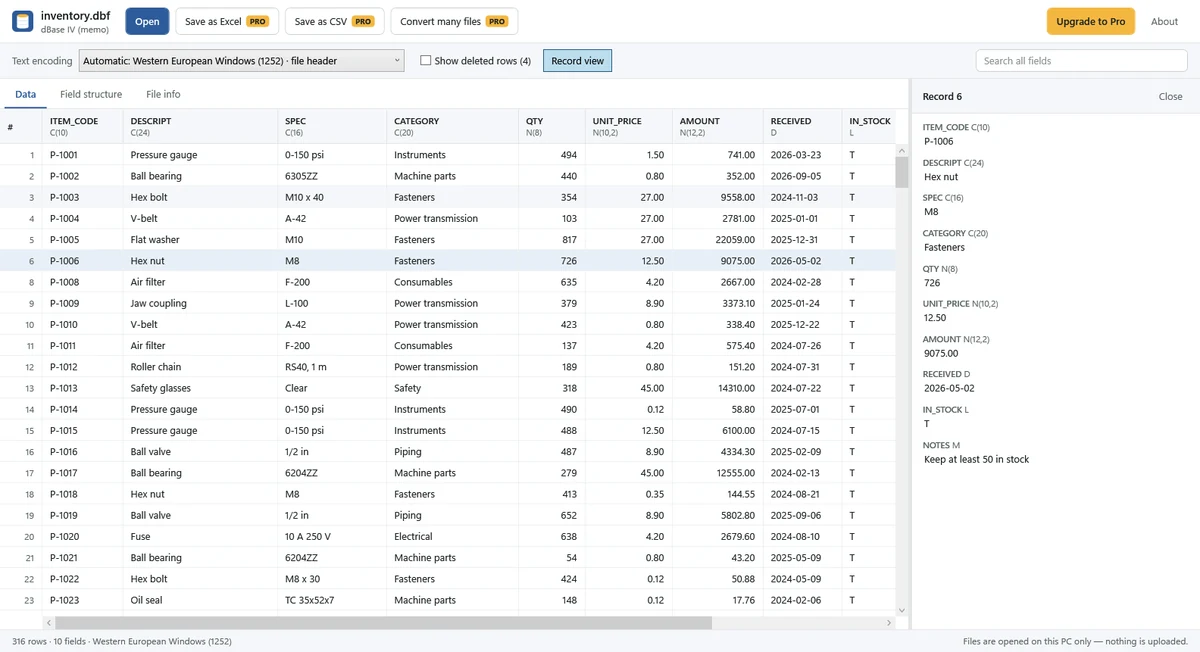
3. Open and save a new Excel or CSV copy
- Install DBF File Viewer from Microsoft Store, then choose Open and select the .dbf.
- Check the encoding and memo text. Search or sort the table, and choose whether to show records marked as deleted.
- Choose Save as Excel or Save as CSV and select an output location. These are Pro features: $7.99, one-time purchase, no subscription. Viewing, searching, sorting and copying one cell or row are free.
- Check the saved copy before using it. Excel (.xlsx) keeps number, date and true/false types; CSV is UTF-8 with a BOM.
Single-file exports follow the current search, sort order and deleted-record setting. Numbers longer than 15 digits are saved as text in .xlsx to retain precision. Memo text beyond Excel's 32,767-character cell limit is truncated in .xlsx; choose CSV when you need to retain longer memo text in the exported file.
For several files, use Convert many files (Pro), choose the DBFs, output folder and Excel or CSV format. Each file uses automatic encoding, and records marked as deleted are excluded. Check each file's result.
What about a Shapefile's .dbf?
Open the .dbf to inspect the Shapefile's attribute table. Keep a matching .cpg encoding file beside it if one was supplied; the app uses it for automatic encoding selection, while a manual selection takes priority. DBF File Viewer reads the table, not the .shp map geometry. It does not edit the original DBF or the map.
Limits to keep in mind
- The app is a viewer and converter, not a DBF editor or SQL tool. Index files (.cdx, .ndx, .mdx) are not used.
- Picture, OLE and binary fields show their size only. Visual FoxPro NULL values appear as empty cells.
- A damaged file may show a message or available rows with a warning. Conversion cannot restore missing bytes or missing memo files.
Files are processed locally without upload. Microsoft Store handles purchase and license checks. See the Privacy Policy or contact support.