SOYATOOLS / GUIDES
How to open ACCDB and MDB files without Access
An .accdb or .mdb file is an Access database, which can contain several tables as well as saved queries and relationships. To read its tables without Microsoft Access, use a viewer that supports the database format, then export the tables you need.
What can you read without Access?
ACCDB & MDB File Viewer is one option on Windows for Access 97 to 2021 databases. Table viewing, sorting, searching and copying a cell or one row are free. It also shows field types, relationships and the SQL text of saved queries. It is a viewer and converter: it does not replace Access for editing, running queries, forms or reports.
1. Open the database and choose a table
- Install the app from Microsoft Store.
- Choose Open and select the .accdb or .mdb, double-click the file, or drag it into the app.
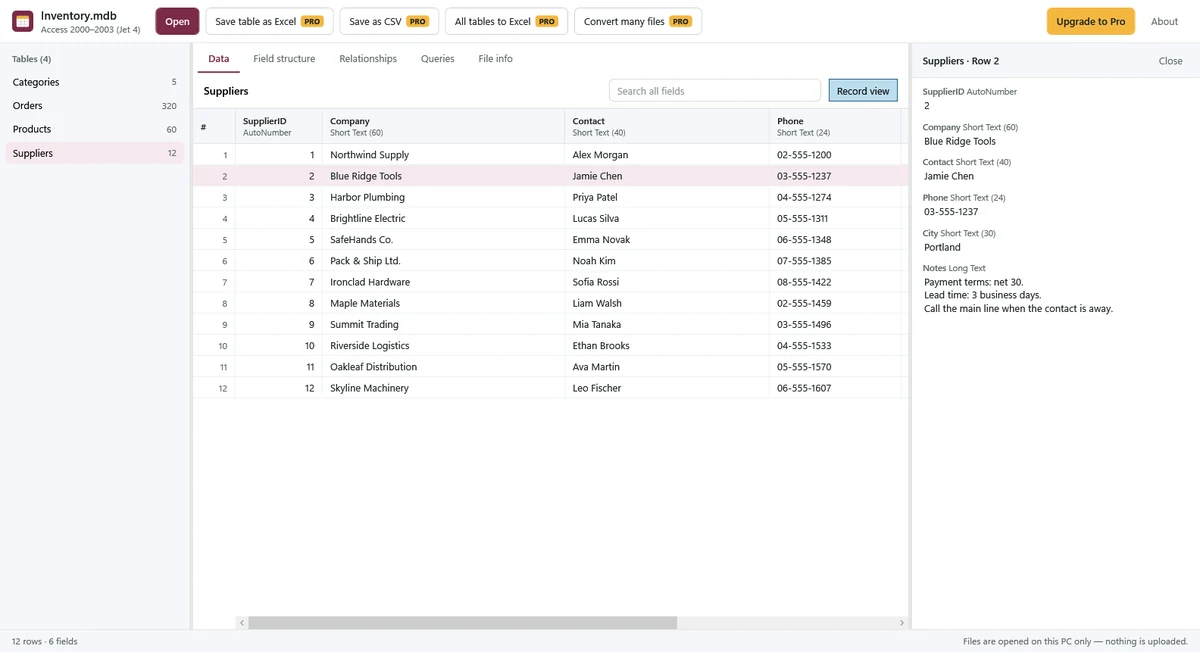
- Choose a table from the list on the left. Check its row count, click a column header to sort, or use search to find text across every field.
- Open Record view to read a full long-text field and see attachment names and sizes. The table preview shows only the beginning of long text.
2. Check text, relationships and saved queries
If text in an Access 97 file looks garbled, select the correct text encoding manually and check several records. Automatic selection uses the file's code page; it may need adjustment.
Use Field structure for field types and descriptions, Relationships for table links, and Queries to read or copy saved SQL. The app does not execute SQL. Linked tables show their target rather than opening the external source; request the source database if you need its rows.
3. Save tables as Excel or CSV
- Choose a table and set any search or sort you want included in the export.
- Choose Save table as Excel or Save as CSV, then choose a destination on your PC.
- To export the database's tables together, choose All tables to Excel. Each table gets its own sheet.
- Check the saved copy. Excel preserves number, date and Yes/No types. CSV uses UTF-8 with a BOM.
Saving tables, all-table Excel export, attachment saving, multiple-row copying and batch conversion require Pro: $7.99, one-time purchase, no subscription. For several databases, batch conversion creates an Excel workbook per file or a CSV per table.
In Excel exports, numbers longer than 15 digits are stored as text to preserve precision. Cells beyond 32,767 characters are truncated, and large tables are split across sheets when needed. Review important long-text fields in the original before using an exported copy.
Why will a file not open, or a table look empty?
| Situation | What to check |
|---|---|
| Password or encryption message | Protected and encoded Jet files are unsupported. The app does not remove protection. |
| A table is marked as linked | Only the link target is shown. The external source's rows are not read. |
| OLE field shows a size | OLE image extraction is unsupported. Attachments are a different field type and can be saved with Pro. |
| Skipped-row or truncated-file warning | The file may be partly damaged. Visible rows do not mean missing data has been recovered. |
| You need a form, report or query result | The viewer does not open forms or reports or run saved queries. |
Files are read locally without upload. See the Privacy Policy or contact support. If your file is a dBase, FoxPro or Shapefile .dbf table, see the DBF guide.