SOYATOOLS / GUIDES
How to open .123 and .wk1 files without Lotus
Old Lotus 1-2-3 and Quattro Pro spreadsheets can be difficult to open in today's Excel. Keep the originals, identify the file family, then view the workbook locally or save a new Excel or PDF copy.
Just need a quick look? Open Lotus 1-2-3 files online in your browser – nothing to install, nothing is uploaded.
Which file do you have?
| File family | Extensions in the app's support list | What to check |
|---|---|---|
| Lotus 1-2-3 | .123, .wk1, .wk3, .wk4, .wks | Saved values, sheet count and formatting |
| Quattro Pro | .wb1, .wb2, .wb3, .wq1, .wq2 | The file version; .qpw is outside this version's support list |
| Works-style spreadsheets | .wks | The creating application: .wks is also used by Lotus-style files |
Extensions alone do not prove what is inside a file. Renaming .wk1 or .123 to .xlsx does not convert the workbook.
1. Ask for an Excel or PDF copy if the sender is available
If the sender can still open the original, ask for an Excel-compatible copy for further work or a PDF for reading. Ask them to check the saved numbers and sheets before sending it. Keep the original spreadsheet too.
2. Open it locally with 123 & WB File Viewer
Our 123 & WB File Viewer is a Windows viewer and converter for these older spreadsheet formats. Lotus 1-2-3 and Quattro Pro do not need to be installed.
- Install the app from Microsoft Store.
- Choose Open, drag the file into the window, or double-click an associated file.
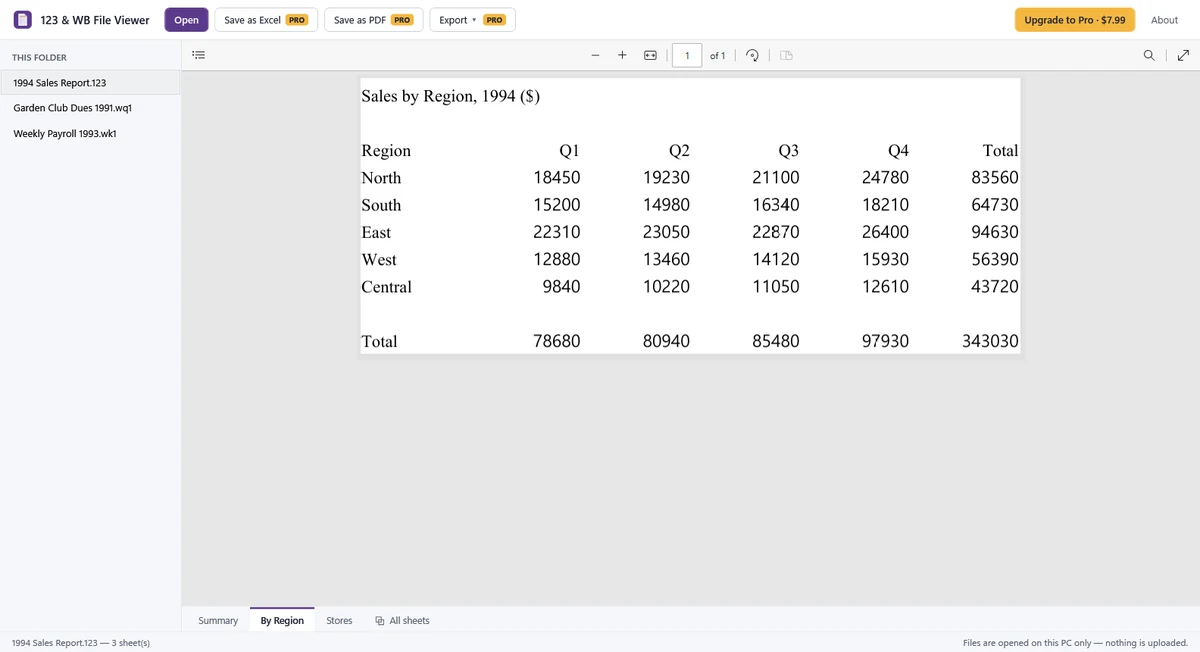
- Move between sheets using the sheet tabs. Zoom and check the saved values. You can select and copy text for free.
- Use the same-folder list to switch to another supported spreadsheet.
3. Save a new Excel copy
Choose Save as Excel and a destination for the new .xlsx file. Excel export requires Pro: $7.99, one-time purchase, no subscription. Opening, navigating sheets, zooming and text copying are free.
Open the exported copy in Excel and review the values, sheets and formatting before using it for calculations or reporting. The app shows values saved in the original file; it does not recalculate formulas or run macros. Do not assume that old formulas or calculations have been refreshed or preserved in the same form during conversion.
4. Save PDF, convert several files or print
With Pro, choose Save as PDF and select all sheets or the sheets you need. Pro also supports converting several files to Excel or PDF in a batch and printing. Very large sheets can span several printable pages, so review the resulting pages.
If a file will not open or looks different
- The app cannot open password-protected files. Ask the owner for an unlocked copy or a suitable export.
- Damaged files and unsupported contents show a message. Ask for a fresh copy if the file is incomplete.
- The app rebuilds pages locally. Fonts, column widths, charts and drawings can differ from the original. It does not edit the source Lotus or Quattro Pro file.
- The tested scope includes Lotus DOS, Release 3 and 97/Millennium, and Quattro Pro DOS and Windows 1 to 6. Real .wb3 and genuine Lotus Release 4 .wk4 samples have not yet been verified; the available .wk4 sample is a Works for Mac file. Compatibility is not guaranteed for every workbook.
- .qpw is outside the supported file list for this version.
Is your .wks a Works spreadsheet?
.wks is shared by different spreadsheet formats. WPD File Viewer is another option for Works spreadsheets, while 123 & WB File Viewer also lists Works-style and Lotus-style .wks support. Check the file's origin if you can.
Viewing and conversion happen on your PC without uploading the spreadsheet. Microsoft Store handles Pro purchases and licensing. See the Privacy Policy or contact support.